In one sentence: Abstract Factory hands you an object whose job is to produce a whole family of matching products, so the client never names a concrete class and can't accidentally mix families.
Real-world analogy
A furniture showroom sells collections, not single pieces. At the door you pick one — Scandinavian or Victorian — and an assistant from that collection is assigned to you. That is the only moment a style is named out loud.
From then on you order by kind: "a chair," "a sofa," "a table." Never "a Victorian chair." The assistant walks off and comes back with the Victorian chair, because that is the only chair they are able to fetch. A Victorian sofa next to a plastic office chair isn't something you have to watch out for — it is not reachable from where you're standing.
The showroom adds a new collection easily: hire one more assistant who knows one more set of pieces, and every customer's ordering habits still work. Adding a new kind of piece is the expensive move. Put "bookcase" on the order form and every assistant in the building has to be trained on it, or the collections that missed the training can no longer serve a complete order.
Mapping the analogy to the pattern:
- Picking the collection at the door → instantiating one ConcreteFactory; the style name appears at that single line and nowhere else in the program.
- Your assistant → the ConcreteFactory itself (
WinFactory,MacFactory); the order form listing "chair, sofa, table" → the AbstractFactory interface. - Each "fetch me a chair" → one creation operation —
createButton(),createCheckbox()below; "chair" as a line on the form is an AbstractProduct, and the Victorian chair that arrives is a ConcreteProduct. - You, ordering only by kind → the Client, which handles nothing but abstract interfaces — which is why the pieces match: one source supplies the whole set.
- New collection = one new assistant; new kind of piece = retrain everyone → new family is one new class, new product type means editing the AbstractFactory and every subclass. That second half is the pattern's known liability.
Another angle: trim levels on a car. Choose "Sport" once at order time and the wheels, seats, and steering wheel that get fitted all belong to that trim — you specify the parts by function, never by trim name, and a Sport seat can't end up in a Base interior.
The problem
Your app draws a login form: a checkbox and a button. It must look native on Windows and on macOS, so you have WinButton, WinCheckbox, MacButton, MacCheckbox.
Written by hand, the form code becomes:
- A branch per widget. Every place that creates a widget repeats the same
if (platform == Windows)test. Ten widgets means ten copies of the same question. - Nothing enforces consistency. One forgotten branch and you ship a macOS button inside a Windows dialog. The compiler is perfectly happy — the types are unrelated.
The solution
Give the family a name and make it an object:
- Declare an abstract factory interface with one creation method per product type:
createButton(),createCheckbox(). - Write one concrete factory per family —
WinFactoryreturns only Windows widgets,MacFactoryonly macOS ones. - The client receives a factory reference and asks it for parts. It knows the abstract
ButtonandCheckboxtypes only.
The platform check now happens exactly once, when you pick the factory. After that, mismatched widgets are impossible by construction. GoF's other name for the pattern says it well: a Kit — you are handed a matched set of parts, not a shelf of loose ones.
Note: GoF describes two ways to build the concrete factories. The usual one is what you see below: each creation method is a factory method that calls a constructor, which means one new factory class per family. If the families are many and differ only slightly, GoF suggests the alternative — give the factory one stored prototype per product and let it
clone()them, so a new family is a new configuration rather than a new class. GoF also notes a concrete factory is usually needed only once per family, so it is often a singleton.
Structure
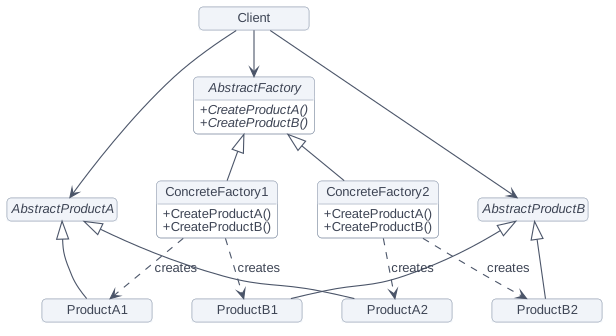
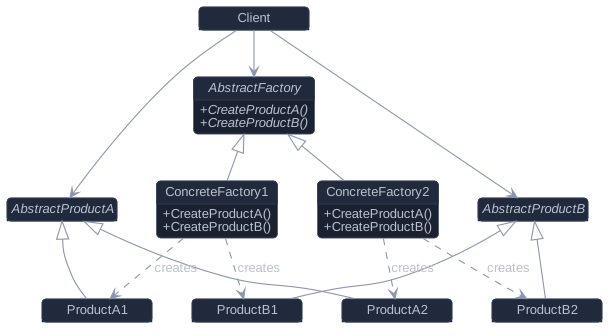
There are two parallel hierarchies here — one of factories, one of products — and the trailing digit is the whole point: a factory numbered 1 creates only products numbered 1.
- AbstractFactory — declares one creation operation per kind of product. In the example below,
GuiFactorywithcreateButton()andcreateCheckbox(). - ConcreteFactory — implements those operations to build one family's products.
WinFactoryandMacFactory. - AbstractProduct — the interface for one kind of product.
ButtonandCheckboxare the two AbstractProducts here. - ConcreteProduct — a product built by the matching concrete factory, implementing its AbstractProduct interface.
WinButton,WinCheckbox,MacButton,MacCheckbox. - Client — uses nothing but the AbstractFactory and AbstractProduct interfaces. That is
drawLoginForm, which names no platform at all.
C++ example
A login form built from whichever widget family it is handed.
#include <iostream>
#include <memory>

// --- Abstract products ---
class Button {
public:
    virtual ~Button() = default;
    virtual void render() const = 0;
};

class Checkbox {
public:
    virtual ~Checkbox() = default;
    virtual void render() const = 0;
};

// --- Concrete products, one set per family ---
class WinButton : public Button {
public:
    void render() const override { std::cout << "[  OK  ]        Windows button\n"; }
};
class WinCheckbox : public Checkbox {
public:
    void render() const override { std::cout << "[x] Remember me Windows checkbox\n"; }
};
class MacButton : public Button {
public:
    void render() const override { std::cout << "(  OK  )        macOS button\n"; }
};
class MacCheckbox : public Checkbox {
public:
    void render() const override { std::cout << "(v) Remember me macOS checkbox\n"; }
};

// --- Abstract factory ---
class GuiFactory {
public:
    virtual ~GuiFactory() = default;
    virtual std::unique_ptr<Button> createButton() const = 0;
    virtual std::unique_ptr<Checkbox> createCheckbox() const = 0;
};

class WinFactory : public GuiFactory {
public:
    std::unique_ptr<Button> createButton() const override { return std::make_unique<WinButton>(); }
    std::unique_ptr<Checkbox> createCheckbox() const override { return std::make_unique<WinCheckbox>(); }
};

class MacFactory : public GuiFactory {
public:
    std::unique_ptr<Button> createButton() const override { return std::make_unique<MacButton>(); }
    std::unique_ptr<Checkbox> createCheckbox() const override { return std::make_unique<MacCheckbox>(); }
};

// Client code: no #ifdef, no platform names.
void drawLoginForm(const GuiFactory& gui) {
    gui.createCheckbox()->render();
    gui.createButton()->render();
}

int main() {
    std::cout << "-- Windows build --\n";
    drawLoginForm(WinFactory{});

    std::cout << "-- macOS build --\n";
    drawLoginForm(MacFactory{});
}-- Windows build --
[x] Remember me Windows checkbox
[ OK ] Windows button
-- macOS build --
(v) Remember me macOS checkbox
( OK ) macOS buttondrawLoginForm is compiled once and mentions no platform at all — swapping the factory swapped both widgets together.
When should you use it?
GoF's applicability list, in plain speech. Use Abstract Factory when:
- Your system should not depend on how its products are created, composed and represented — it just wants working objects.
- The system should be configured with one of several families of products: platform widgets, database drivers (connection + command + reader), light and dark themes.
- A group of products is designed to be used together and you need to enforce that. This is the bullet people forget, and it is the one that makes the pattern worth its weight — the factory is what stops a macOS button appearing in a Windows dialog.
- You are publishing a library of products and want to expose only their interfaces, keeping every implementation class private.
Pros and cons
Pros (GoF's consequences)
- It isolates concrete classes. Product class names appear inside the concrete factory and nowhere else; clients only ever handle abstract interfaces.
- Swapping families is easy. The concrete factory's class name appears exactly once in the program — the line where it is instantiated. Change that line and the whole family changes at once.
- It promotes consistency among products. Because one factory produces the entire family, an application uses objects from one family at a time by construction.
Cons
- Supporting a new kind of product is difficult (GoF's own liability): the AbstractFactory interface fixes the set of products, so a new product type means editing the abstract factory and every subclass.
- Many small classes for what is conceptually one decision, and the indirection buys nothing until there are at least two families.
- GoF's escape hatch — a single parameterised
Make(kind)operation instead of one method per product — trades that away for safety: everything comes back through one abstract return type, so a client that needs the concrete type is stuck downcasting, and the downcast can fail.
Note: Abstract Factory pays off along one axis only. If families change often, it fits. If the set of products changes often, you will be editing every factory each time — reconsider.
How to remember it
Memory hook: "One showroom, one whole suite." You choose the style once at the door and every piece that arrives matches. Don't confuse it with its sibling: Factory Method is one product, decided by subclasses; Abstract Factory is a whole matching family per factory — literally several factory methods bundled into one object.
Related patterns
- Factory Method — the usual way to implement each of an abstract factory's creation operations.
- Prototype — the other way GoF gives: store one prototype per product and clone it, which avoids a new factory subclass for every family.
- Singleton — GoF notes that a concrete factory is typically needed only once per family, so it is often a singleton.
- Builder — also hides construction, but assembles one complicated object step by step and hands it over at the end; an abstract factory returns each product immediately.