In one sentence: Facade provides a unified interface to a set of interfaces in a subsystem — one higher-level front door that makes the subsystem easier to use.
Real-world analogy
You stop at the hotel's concierge desk on your way out: "dinner for two at eight, then the show, and a car to get us there." One sentence, one person, one desk.
Behind the desk that sentence becomes four phone calls in a particular order — the restaurant, the box office, the taxi firm, and the front desk to leave the tickets with your key. You never learn which company handles which part, and you certainly never learn that the theatre must be called before the taxi is booked, because the curtain time decides the pickup. The concierge holds all of that so you don't have to.
Notice what the restaurant knows about this: nothing. It takes a table booking exactly as it would from anyone, and has never heard of the desk in your hotel lobby. And notice what you're still allowed to do — walk to the restaurant yourself, ask for the corner table by the window, negotiate the wine. The desk is a convenience, not a gate.
Mapping the analogy to the pattern:
- The concierge → the Facade, who knows which specialist handles what and in which order.
- The restaurant, box office and taxi firm → the subsystem classes — they do the real work and hold no reference back to the facade.
- "Dinner at eight, then the show" → the simplified higher-level method that covers the case almost every guest wants.
- The four calls placed in the right sequence → the facade delegating, absorbing the ordering rules that used to be the caller's problem.
- Booking the restaurant yourself → the subsystem stays fully open; a facade simplifies access without locking anything away.
Another angle: the start button in a car. One press coordinates fuel pump, starter motor and engine computer in a strict sequence — and a mechanic can still reach every one of those parts directly when the simple front door isn't enough.
The problem
A video conversion library gives you VideoFile, CodecFactory, BitrateReader, AudioMixer, and a dozen more classes. You just want to turn an MP4 into a WebM.
- You must learn the whole subsystem to do one thing. Correct usage means calling five classes in exactly the right order.
- The ceremony gets copy-pasted. The same fifteen lines appear in every place that converts a video.
- Upgrades break everything. When the library reorders its API, every one of those copies has to be found and fixed.
GoF makes a sharper point about why this happens: applying patterns tends to break a subsystem into more, smaller, more customizable classes. That's good for the people extending it and bad for the people who just want the default behavior. A facade restores the default view without taking the customizability away.
The solution
Write one class with one obvious method that performs the common workflow, and let it hold all the subsystem knowledge:
- Identify the task callers actually want (
convert(file, format)). - Put the full sequence of subsystem calls inside a single facade method.
- Have client code depend only on the facade.
The subsystem stays exactly as it is — nothing is hidden or removed. Power users can still call the classes directly; everyone else calls one method. When the library changes, you fix one file.
Note: GoF's implementation section offers a way to cut the coupling further: make the Facade an abstract class with a concrete subclass per subsystem implementation, so clients don't even know which implementation they're talking to. If that's too heavy, the lighter alternative is to make the facade configurable — hand it its subsystem objects instead of hard-coding them. The example below hard-codes a code path for clarity, which GoF notes is the right call when there really is only one sensible default; parameterize it and you gain flexibility but chip away at the pattern's whole mission, which is to make the common case trivial.
Structure
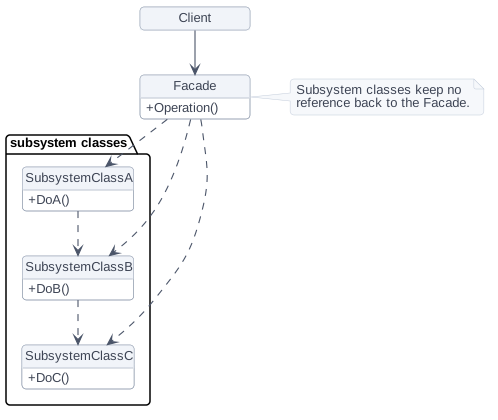
Only two participants, and the second one is a crowd:
- Facade — knows which subsystem classes are responsible for which request, and delegates client requests to the right subsystem objects. In the example:
VideoConverter. - Subsystem classes — implement the actual functionality and handle work assigned by the facade. Crucially, they have no knowledge of the facade and keep no reference to it. In the example:
VideoFile,CodecFactory,BitrateReader,AudioMixer.
Clients talk to the facade; the facade forwards. It may do a little translation work of its own to bridge its interface to the subsystem's, but the subsystem does the real work — and clients that need more power can still reach past the facade.
C++ example
A VideoConverter facade hiding codec detection, decoding, re-encoding, and audio fixing.
#include <iostream>
#include <memory>
#include <string>
#include <utility>

// --- The complicated subsystem callers should not have to learn ---
class VideoFile {
public:
    explicit VideoFile(std::string name) : name_(std::move(name)) {
        std::cout << "Reading " << name_ << "\n";
    }
    std::string name() const { return name_; }
private:
    std::string name_;
};

class CodecFactory {
public:
    static std::string extract(const VideoFile& file) {
        std::string codec =
            file.name().find(".mp4") != std::string::npos ? "mpeg4" : "ogg";
        std::cout << "Detected codec: " << codec << "\n";
        return codec;
    }
};

class BitrateReader {
public:
    static std::string read(const VideoFile& file, const std::string& codec) {
        std::cout << "Decoding with " << codec << "\n";
        return "raw:" + file.name();
    }
    static std::string convert(const std::string& buffer, const std::string& target) {
        std::cout << "Re-encoding to " << target << "\n";
        return buffer + "->" + target;
    }
};

class AudioMixer {
public:
    static std::string fix(const std::string& stream) {
        std::cout << "Normalizing audio\n";
        return stream;
    }
};

// --- The facade: one method, sane defaults, no subsystem knowledge required ---
class VideoConverter {
public:
    std::string convert(const std::string& filename, const std::string& format) const {
        VideoFile file(filename);
        std::string codec  = CodecFactory::extract(file);
        std::string buffer = BitrateReader::read(file, codec);
        std::string result = BitrateReader::convert(buffer, format);
        return AudioMixer::fix(result);
    }
};

int main() {
    auto converter = std::make_unique<VideoConverter>();
    std::string out = converter->convert("holiday.mp4", "webm");
    std::cout << "Result: " << out << "\n";
}Reading holiday.mp4
Detected codec: mpeg4
Decoding with mpeg4
Re-encoding to webm
Normalizing audio
Result: raw:holiday.mp4->webmFive subsystem classes ran in a precise order, and main only had to know one method name and two arguments.
When should you use it?
GoF's applicability list, in plain speech. Use Facade when:
- You want to give a complex subsystem a simple default view that's good enough for most clients, leaving the full API available to the few who need to customize.
- There are many dependencies between clients and the implementation classes of an abstraction, and you want to decouple the subsystem from its clients and from other subsystems — which buys you independence and portability.
- You want to layer your subsystems. Give each layer a facade as its entry point, and where subsystems depend on each other, make them talk only through each other's facades.
Tip: A facade that grows past a few dozen methods has become a god object. When that happens, split it into several focused facades rather than letting one class own the whole system.
Pros and cons
Pros (GoF's consequences)
- It shields clients from subsystem components, cutting the number of objects a caller has to deal with, and making the subsystem easier to use.
- It promotes weak coupling between the subsystem and its clients. Subsystem components are often tightly coupled to each other; a facade lets you rework them without touching client code, and can break complex or circular dependency chains.
- It cuts compilation dependencies — vital in large C++ systems, where a small change in an important subsystem can otherwise trigger a rebuild of everything. It also makes porting easier, since building one subsystem no longer implies building all the others.
- It doesn't lock anything away. Applications that need the subsystem classes directly can still use them, so you get to choose per-caller between ease of use and generality.
Cons
- Risks becoming a bloated class coupled to every part of the system.
- Hides capability — callers may not realize the subsystem can do more.
- Adds a layer that must be kept in sync as the subsystem evolves.
How to remember it
Memory hook: "The receptionist." One desk in the lobby, and behind it a whole building of departments that have never heard of the desk. That last part is the crisp test against Mediator: a facade's subsystem classes don't know the facade exists, while a mediator's colleagues know about their mediator and talk through it by design. Against the wrappers: Facade fronts many objects with a new, simpler interface; Adapter fronts one object with an existing interface it must match.
Related patterns
- Abstract Factory — can be used with a Facade to create subsystem objects in a subsystem-independent way, and is also an alternative to Facade when the goal is specifically hiding platform-specific classes.
- Mediator — also abstracts functionality out of existing classes, but it centralizes communication between colleagues and defines new behavior; a facade only simplifies access to what's already there.
- Singleton — usually only one facade object is needed, so facades are often singletons.
- Adapter — wraps one object to match an existing interface; a facade defines a new, simpler one over many objects.